Guide complet des fonctionnalités
Découvrez comment Freelance Platform vous accompagne à chaque étape de votre activité de freelance. Du business plan à la facturation, maîtrisez tous les outils à votre disposition.

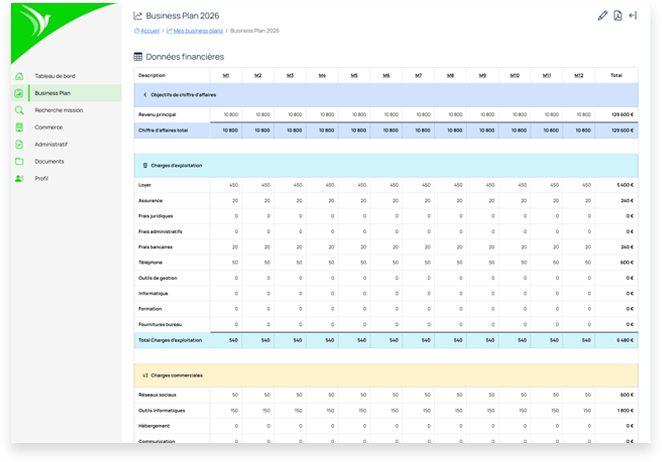
Business Plan
Construisez un business plan solide orienté revenus. Définissez vos objectifs financiers, testez vos hypothèses et transformez votre vision en plan d'action concret.
-
Définition des objectifs de CA
Fixez vos objectifs de chiffre d'affaires annuel et mensuel. La plateforme calcule automatiquement le nombre de jours facturés nécessaires.
-
Simulation de scénarios
Testez différentes hypothèses : TJM, taux d'occupation, charges. Visualisez l'impact sur votre rentabilité en temps réel.
-
Suivi des charges
Intégrez toutes vos charges fixes et variables : URSSAF, mutuelle, assurance RC Pro, outils, formation...
-
Export PDF professionnel
Générez un business plan PDF complet pour vos démarches bancaires ou administratives.

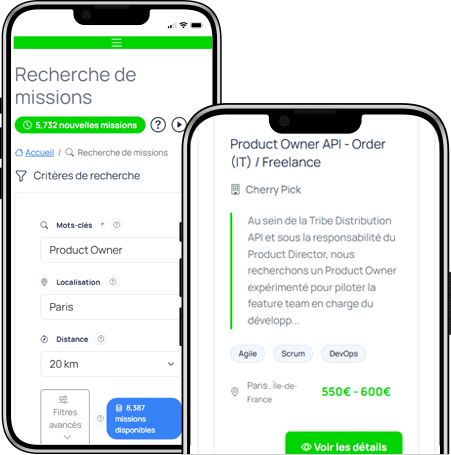
Recherche de missions
Accédez aux meilleures opportunités du marché grâce à nos intégrations avec les principales plateformes de freelance. Centralisez votre recherche et gagnez du temps.
-
Intégration multi-plateformes
Accédez aux offres de Freework, Collective Work et autres plateformes directement depuis votre espace.
-
Filtres avancés
Filtrez par compétences, localisation, TJM, type de contrat et durée de mission.
-
Alertes personnalisées
Configurez des alertes pour être notifié dès qu'une mission correspondant à vos critères est publiée.
-
Conversion en opportunité
Transformez une mission intéressante en opportunité commerciale en un clic pour la suivre dans votre pipeline.

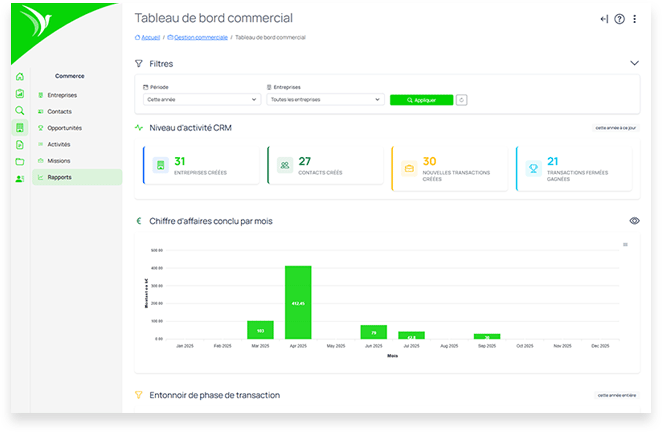
CRM & Gestion commerciale
Structurez votre démarche commerciale avec un CRM pensé pour les freelances. Gérez vos contacts, suivez vos opportunités et ne laissez plus aucune relance passer.
-
Gestion des entreprises
Centralisez les informations de vos clients et prospects : coordonnées, SIRET, historique des échanges, documents associés.
-
Gestion des contacts
Associez plusieurs contacts à chaque entreprise. Gardez trace de vos interlocuteurs et de leurs rôles.
-
Pipeline d'opportunités
Suivez vos opportunités commerciales avec un Kanban intuitif. Visualisez votre pipe et anticipez votre charge.
-
Planification d'activités
Planifiez vos appels, rendez-vous et relances. Ne manquez plus aucune action commerciale importante.
-
Calendrier intégré
Visualisez toutes vos activités commerciales dans un calendrier dédié. Synchronisez avec votre agenda.

Contrats
Générez des contrats professionnels en quelques clics. Personnalisez les clauses, suivez les versions et envoyez pour signature électronique.
-
Génération automatique
Créez des contrats à partir de vos missions en un clic. Les informations client et mission sont pré-remplies automatiquement.
-
Modèles personnalisables
Utilisez des modèles de contrats adaptés à votre activité. Personnalisez les clauses selon vos besoins.
-
Éditeur intégré
Modifiez vos contrats directement dans la plateforme avec un éditeur de texte riche.
-
Suivi des statuts
Suivez l'état de vos contrats : brouillon, envoyé, validé, signé. Gardez un historique complet.
-
Envoi par email
Envoyez vos contrats directement par email à vos clients depuis la plateforme.
-
Export PDF
Téléchargez vos contrats au format PDF professionnel, prêts à être signés.
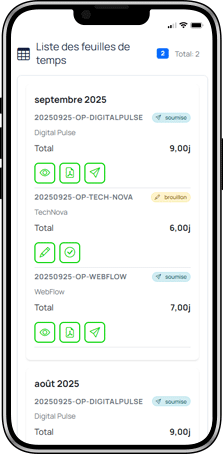
Comptes-rendus d'activité (CRA)
Saisissez vos temps facilement et générez des CRA professionnels. Suivez votre activité mission par mission et envoyez vos relevés à vos clients.
-
Saisie simplifiée
Renseignez vos jours travaillés facilement avec une interface calendrier intuitive.
-
Vue par mission
Visualisez et gérez vos temps par mission. Chaque mission a son propre suivi.
-
Validation mensuelle
Validez vos CRA mois par mois. Une fois validés, ils sont verrouillés pour garantir l'intégrité des données.
-
Export PDF
Générez des CRA PDF professionnels avec le détail des jours travaillés, prêts à être envoyés.
-
Envoi aux clients
Envoyez vos CRA directement par email à vos clients depuis la plateforme.
-
Historique complet
Consultez l'historique de tous vos CRA. Retrouvez facilement vos relevés passés.
Devis
Rédigez des devis professionnels et suivez leur acceptation. Transformez-les en factures d'un simple clic une fois acceptés par vos clients.
-
Création rapide
Créez des devis en quelques clics. Ajoutez vos prestations, quantités et tarifs facilement.
-
Numérotation automatique
Les numéros de devis sont générés automatiquement selon votre format personnalisé.
-
Calcul de TVA
La TVA est calculée automatiquement selon les taux configurés. Gérez plusieurs taux si nécessaire.
-
Envoi par email
Envoyez vos devis directement par email à vos clients avec un message personnalisé.
-
Suivi des statuts
Suivez l'état de vos devis : brouillon, envoyé, accepté, refusé. Relancez si nécessaire.
-
Conversion en facture
Transformez un devis accepté en facture en un clic. Toutes les informations sont reprises.
Factures
Créez et gérez vos factures professionnelles conformes à la réglementation. Suivez vos paiements et automatisez vos relances.
-
Facturation depuis CRA
Générez vos factures directement depuis vos comptes-rendus d'activité validés.
-
Conformité légale
Factures conformes à la réglementation française avec toutes les mentions obligatoires.
-
Numérotation automatique
Numérotation séquentielle automatique conforme aux exigences légales.
-
Suivi des paiements
Marquez vos factures comme payées et suivez vos encaissements en temps réel.
-
Relances automatiques
Configurez des rappels pour les factures impayées. Ne courez plus après vos règlements.
-
Avoirs
Générez des factures d'avoir en cas de remboursement ou correction.
-
Export comptable
Exportez vos données au format compatible avec les logiciels comptables.

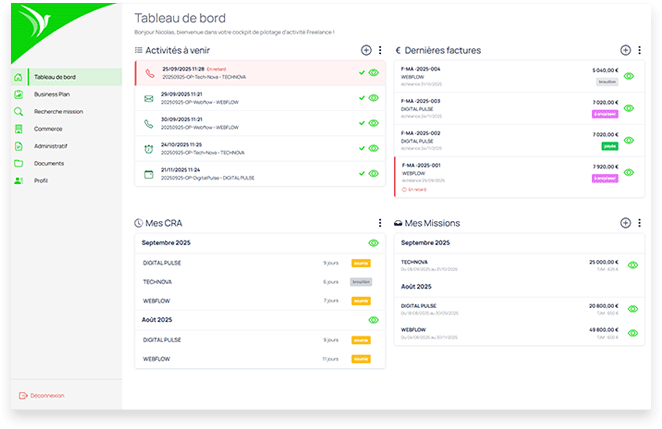
Tableaux de bord
Pilotez votre activité en temps réel. Visualisez vos KPIs, anticipez votre trésorerie et prenez les bonnes décisions grâce à des tableaux de bord complets.
-
KPIs en temps réel
Suivez vos indicateurs clés : CA réalisé vs objectif, taux d'occupation, nombre de jours facturés.
-
Suivi du chiffre d'affaires
Visualisez l'évolution de votre CA mois par mois. Comparez avec vos objectifs et l'année précédente.
-
Pipeline commercial
Évaluez le potentiel de votre pipe. Anticipez votre charge et identifiez les opportunités prioritaires.
-
Suivi des paiements
Gardez un oeil sur vos encaissements. Identifiez rapidement les retards de paiement.
Gestion documentaire
Centralisez tous vos documents professionnels. Contrats, factures, CRA, documents clients : tout est organisé et accessible en quelques clics.
-
Stockage sécurisé
Tous vos documents sont stockés de manière sécurisée et accessibles depuis n'importe où.
-
Organisation par dossiers
Créez une arborescence de dossiers adaptée à votre organisation. Retrouvez vos documents instantanément.
-
Prévisualisation
Prévisualisez vos documents PDF directement dans l'interface sans avoir à les télécharger.
-
Partage simplifié
Partagez facilement vos documents avec vos clients via un lien sécurisé.
Profil & Entreprise
Configurez votre profil personnel et les informations de votre entreprise. Ces données sont utilisées pour générer vos documents professionnels conformes.
-
Informations personnelles
Gérez vos coordonnées, photo de profil et préférences de notification.
-
Entreprise freelance
Renseignez les informations légales de votre entreprise : SIRET, adresse, forme juridique, TVA.
-
Coordonnées bancaires
Ajoutez vos RIB pour qu'ils apparaissent automatiquement sur vos factures.
-
Logo entreprise
Uploadez votre logo pour personnaliser vos documents (factures, devis, contrats).
-
Préférences newsletter
Choisissez les communications que vous souhaitez recevoir : actualités, conseils, mises à jour.
Sécurité du compte
Protégez votre compte avec des fonctionnalités de sécurité avancées. Activez l'authentification à deux facteurs pour une protection optimale de vos données.
-
Authentification à deux facteurs (2FA)
Ajoutez une couche de sécurité supplémentaire avec un code envoyé par email lors de la connexion.
-
Gestion des appareils de confiance
Visualisez et gérez les appareils autorisés à accéder à votre compte sans 2FA.
-
Modification du mot de passe
Changez votre mot de passe à tout moment depuis les paramètres de sécurité.
-
Révocation des sessions
Déconnectez tous les appareils de confiance en un clic en cas de doute.
Abonnement & Facturation
Gérez votre abonnement Freelance Platform en toute simplicité. Consultez vos factures, mettez à jour votre moyen de paiement et suivez votre consommation.
-
Statut de l'abonnement
Visualisez votre formule actuelle, la date de renouvellement et l'état de votre abonnement.
-
Historique des factures
Accédez à toutes vos factures d'abonnement et téléchargez-les au format PDF.
-
Moyen de paiement
Mettez à jour votre carte bancaire ou changez de moyen de paiement en toute sécurité.
-
Période d'essai
Profitez de 30 jours d'essai gratuit sans carte bancaire pour tester toutes les fonctionnalités.
-
Annulation
Résiliez votre abonnement à tout moment sans engagement. Vos données restent accessibles jusqu'à la fin de la période payée.
Conseils pour bien démarrer
Commencez par votre profil
Renseignez les informations de votre entreprise (SIRET, coordonnées bancaires) pour pouvoir générer des factures conformes.
Créez votre Business Plan
Définissez vos objectifs de CA et vos charges pour avoir une vision claire de votre activité dès le départ.
Importez vos clients existants
Ajoutez vos clients actuels dans le CRM pour centraliser toute votre activité commerciale.
Configurez vos alertes
Paramétrez les notifications pour les relances de factures et les rappels d'activités commerciales.
Prêt à transformer votre activité ?
Rejoignez les freelances qui ont choisi de piloter leur activité comme de vrais entrepreneurs.
Commencer maintenant